
How to add Pairio to Google Calendar invites
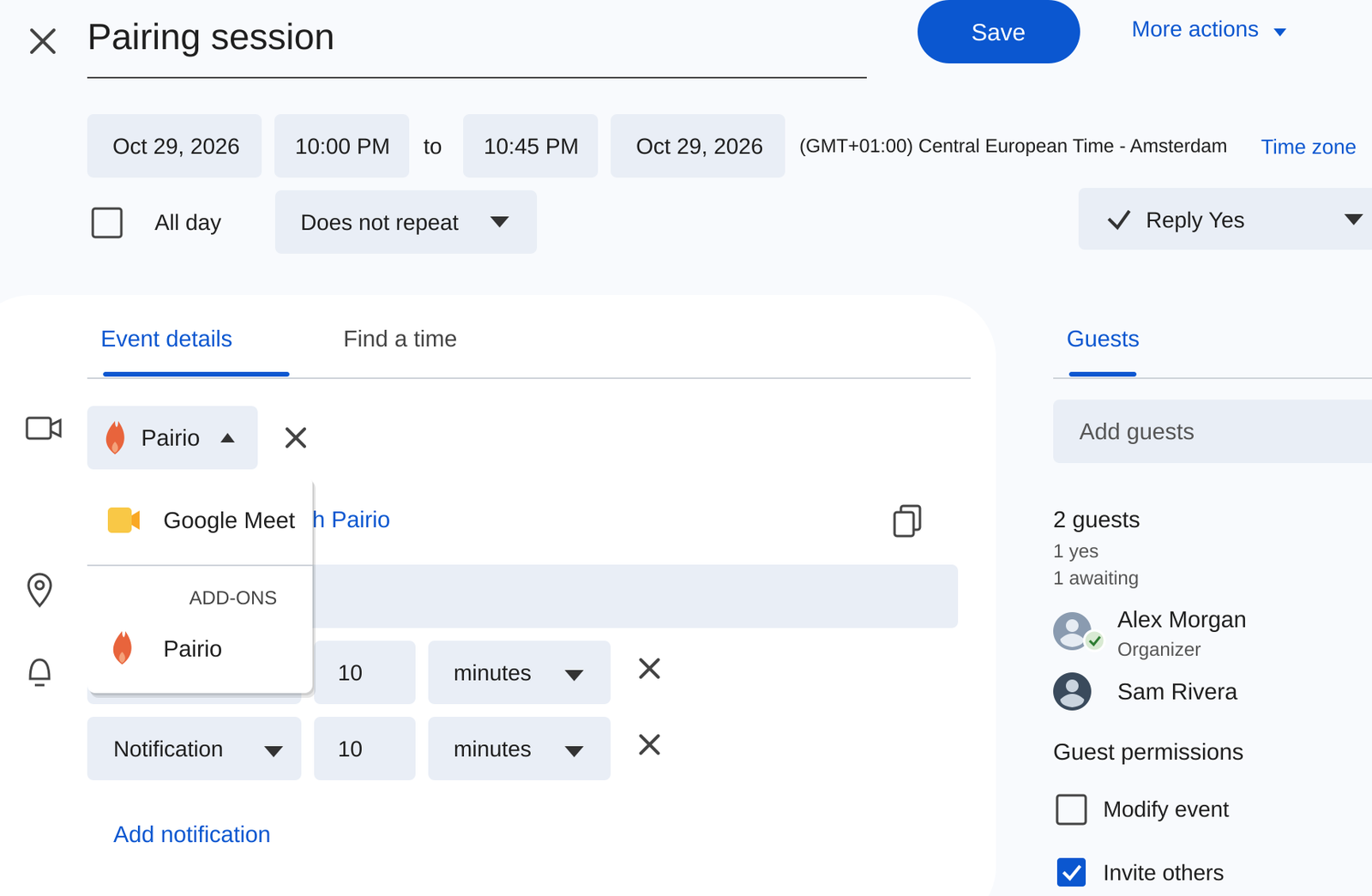
Pick Pairio instead of Google Meet when you create a Google Calendar event. Install the add-on once, then guests join with a link from their browser or the Mac app.
Written by Joyce
Short answer
Install the Pairio add-on from the Google Workspace Marketplace once. After that, when you create an event in Google Calendar, you can pick Pairio in the video conferencing menu instead of Google Meet. The invitation shows a Join with Pairio button, and guests join from their browser or from the Pairio for Mac app.
Who this is for
- Teams that plan their pairing sessions, reviews or client sessions in Google Calendar.
- Freelancers and agencies who invite clients: the client clicks the link and joins from the browser, without installing anything.
- Anyone who wants a planned session where the other person can draw on the shared screen, or click and type in it.
For quick unplanned help you do not need the calendar: click a contact's name in the Pairio menu at the top of your screen.
Step by step
- Install the add-on once. Open the Pairio add-on in the Google Workspace Marketplace and install it for your Google account. Without the add-on, Pairio does not appear in the menu.
- Create an event in Google Calendar and add your guests.
- Choose Pairio in the video conferencing menu of the event, where you would normally see Google Meet.
- Save and send. The invitation now shows Join with Pairio and links to a Pairio meeting link (it looks like pairio.app/m/code).
- At the time of the meeting, guests click the link. The page shows Open in Pairio and Join in browser.
- Browser guests allow camera and microphone, sign in with Continue with Google or Continue with email (a new account takes a few seconds), see a preview and click Join call. The microphone is on right away; the camera is off until they turn it on.
- There is no waiting room. Guests who sign in join the call directly.
What you can do in the call
- Share your Mac screen sharply enough to read code, small numbers or design details.
- Let guests draw on your screen, or click and type in it with their own mouse and keyboard, also from the browser.
- Send files during the call. They go directly from Mac to Mac, not through our servers.
- Up to 4 people per call.
Why Pairio fits planned sessions
- Same invite flow as Meet. Your guests get a normal calendar invite with one button.
- Nothing to install for guests. People without a Mac join from the browser.
- Made for working together, not for presenting. The other person can point and take over, instead of saying "click there".
- Free for 10 hours per month per user, with all features and without a credit card. Pro is $15 per user per month.
- Hosted in the EU and end-to-end encrypted.
When Pairio is not the right choice
- Meetings with more than 4 people. Use Google Meet for those.
- Presentations and webinars. Meet or Zoom are built for that.
- Guests who cannot create an account. Joining a Pairio call needs an account (Google or email). If your guest cannot or will not sign up, use a tool that lets them join without one.
- You only want to share one window. Pairio shares your whole screen.
- A browser guest needs others to control their screen. When a browser guest shares their own screen, others can only draw on it.
Questions people ask
Can I use Pairio instead of Google Meet in Google Calendar? Yes. Install the Pairio add-on from the Google Workspace Marketplace, then pick Pairio in the video conferencing menu of an event.
Why don't I see Pairio in the Google Calendar menu? The add-on is not installed yet. Install it from the Google Workspace Marketplace first.
Do my guests need the Pairio app? No. They can join from their browser. People with the Mac app can open the call in Pairio.
Do guests need an account? Yes, but they can create one on the meeting page with Google or their email.
Is there a waiting room? No. Anyone with the link who signs in joins directly.
Which browsers work? Guests can join from Google Chrome, Safari, Microsoft Edge, Firefox and Brave.
Does Pairio work with Outlook or Microsoft Teams calendars? Not yet. Pairio currently has an add-on for Google Calendar only.